
I made a command that documents my entire codebase every time I take a break. It is called /document-project, it runs inside Cursor and Claude Code, and it takes 5 seconds to trigger and 2 to 3 minutes to run. I do it on a coffee break and come back to a fully oriented repo.
Why do AI agents need this at all?
AI agents have no memory between sessions. Every time you start fresh, they do not know your folder structure, your conventions, or why you made the architecture decisions you did. So they guess. And the guesses accumulate: a helper duplicated here, a naming convention broken there, an "improvement" that undoes a decision you made for a reason.
Agents do not fail because they are weak. They fail because every session starts blind.
What does the command produce?
My fix is a single markdown prompt file I drop into the project. When I type /document-project, the agent walks the whole repo and produces:
AGENTS.mdat the root: build commands, a layout map, conventions, and footguns- Short folder READMEs, but only where they actually help navigation
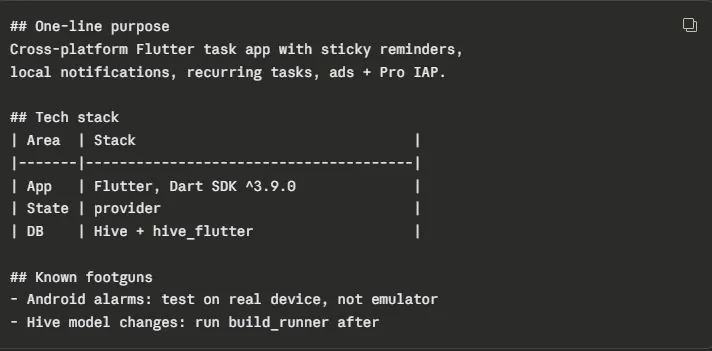
That is the kind of precision that saves 10 minutes of re-orientation at the start of every session. The agent reads the map instead of rediscovering the territory, and its first suggestion is grounded instead of generic.
How do you set it up?
Installation is one file:
- Cursor: drop the file in
.cursor/nameddocument-project.md - Claude Code: drop the file in
.claude/commands/nameddocument-project.md
Then just type /document-project in the chat. That is it. The prompt file I use is public: grab it from this gist.
Re-run it whenever the codebase has drifted from the docs: after a feature lands, after a refactor, or simply whenever you step away from the keyboard. Documentation that regenerates in minutes is documentation that stays true. This habit is one of the standard practices I set up for teams in AI consulting engagements, because it is the cheapest quality upgrade an agent-assisted codebase can get.
FAQ
Why do AI coding agents need a documentation file?
AI agents have no memory between sessions. Every fresh session starts without knowing your folder structure, conventions, or architecture decisions, so the agent guesses, and the guesses accumulate as inconsistent code. A root AGENTS.md file gives every new session the same orientation in seconds.
How do I install a custom slash command in Cursor or Claude Code?
For Cursor, drop the prompt file into the .cursor folder as document-project.md. For Claude Code, drop it into .claude/commands as document-project.md. Then type /document-project in the chat and the agent walks the repo and writes the documentation.