
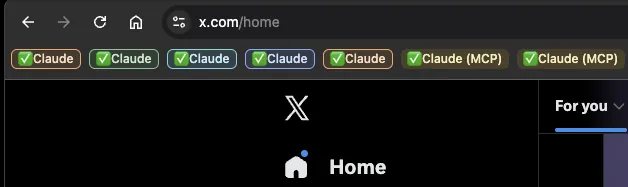
If you use the Claude Chrome Extension to give Claude Code access to a browser, I assume your Chrome sometimes looks like a rainbow of leftovers. Every colored "Claude" is a tab group the extension opened. Every session creates another one, and they stay and pile up. That is how it works; it is not something you are doing wrong.
What is the fix?
Switch to agent-browser, an open source tool from Vercel. It runs a separate instance of Chrome (Chrome for Testing), with no extension and without messing up your own Chrome.
Installation:
brew install agent-browser
agent-browser install
Since Claude sometimes decides it cannot find a browser, I also recommend adding these lines to CLAUDE.md:
## Browser Automation
Use the agent-browser CLI for ALL browser tasks.
Never use the macOS open command or the chrome extension.
The big advantage: a persistent profile of its own
In my eyes the strongest feature is that you can give the agent a fixed profile of its own. Add a small file at ~/.agent-browser/config.json:
{
  "profile": "/Users/you/agent-profile",
  "headed": true
}
Now Claude has a browser of its own, with accounts of its own. A separate Google account, a separate X login, whatever you want, all fully isolated from your personal accounts. Log in once in the window, and it persists.
The agent gets its own identity on the web, and your accounts stay yours.
One warning before you hand over the keys
Do not forget that an agent with its own accounts running autonomously is also a prompt injection surface. A malicious page can try to steer it. Give it access only to an environment you are comfortable letting it act in, and treat that boundary as a real security decision.
Browser automation with proper isolation is a core building block in most agent projects I build for clients: the difference between a demo and something you can safely leave running is exactly these boundaries.
FAQ
What is agent-browser and why use it over the Chrome extension?
agent-browser is an open source tool from Vercel that runs a separate Chrome for Testing instance for your agent. No extension, no piles of tab groups in your personal browser, and you can give the agent a persistent profile of its own with separate accounts, fully isolated from yours.
Is giving an agent its own logged-in browser safe?
An agent with its own accounts running autonomously is also a prompt injection surface. Keep the agent profile limited to accounts and environments you are comfortable letting it act in, and treat that boundary as a real security decision, not a convenience.